Create your own word search in 10 steps
Create personalized word search puzzles (also known as word find or letter jumble) with your own word lists – your words are hidden in a grid of random letters and can be found horizontally, vertically or diagonally.


Launch the program and create a new word search project
Open Puzzle-Generator or select File → New from the menu. In the dialog, choose the puzzle type Word Search.
A new project is created, providing you with tabs for the word list, generation and export of the puzzle. From here you have access to all settings that make your puzzle unique.

Enter words – define your theme
In the middle area, enter the words that should be hidden in the letter grid. These words will later be scattered among random letters – the puzzle solvers have to find them.
- Click on the green circled plus icon in the upper toolbar. In the popup window that appears, enter your new word and confirm with Enter – it is automatically added to the word list.
- On the left side you will find thematically sorted categories with various word lists. Select the appropriate entries to automatically add these words to your puzzle.

Import word lists
Already have a ready-made word list? Import it conveniently from various file formats instead of typing each word individually.
- Excel (.xlsx), CSV (.csv) or text files (.txt)
- One word per line or separated by semicolons
- Drag & drop support for quick loading
- Predefined word collections in various categories for a quick start
Set grid size, shape and directions
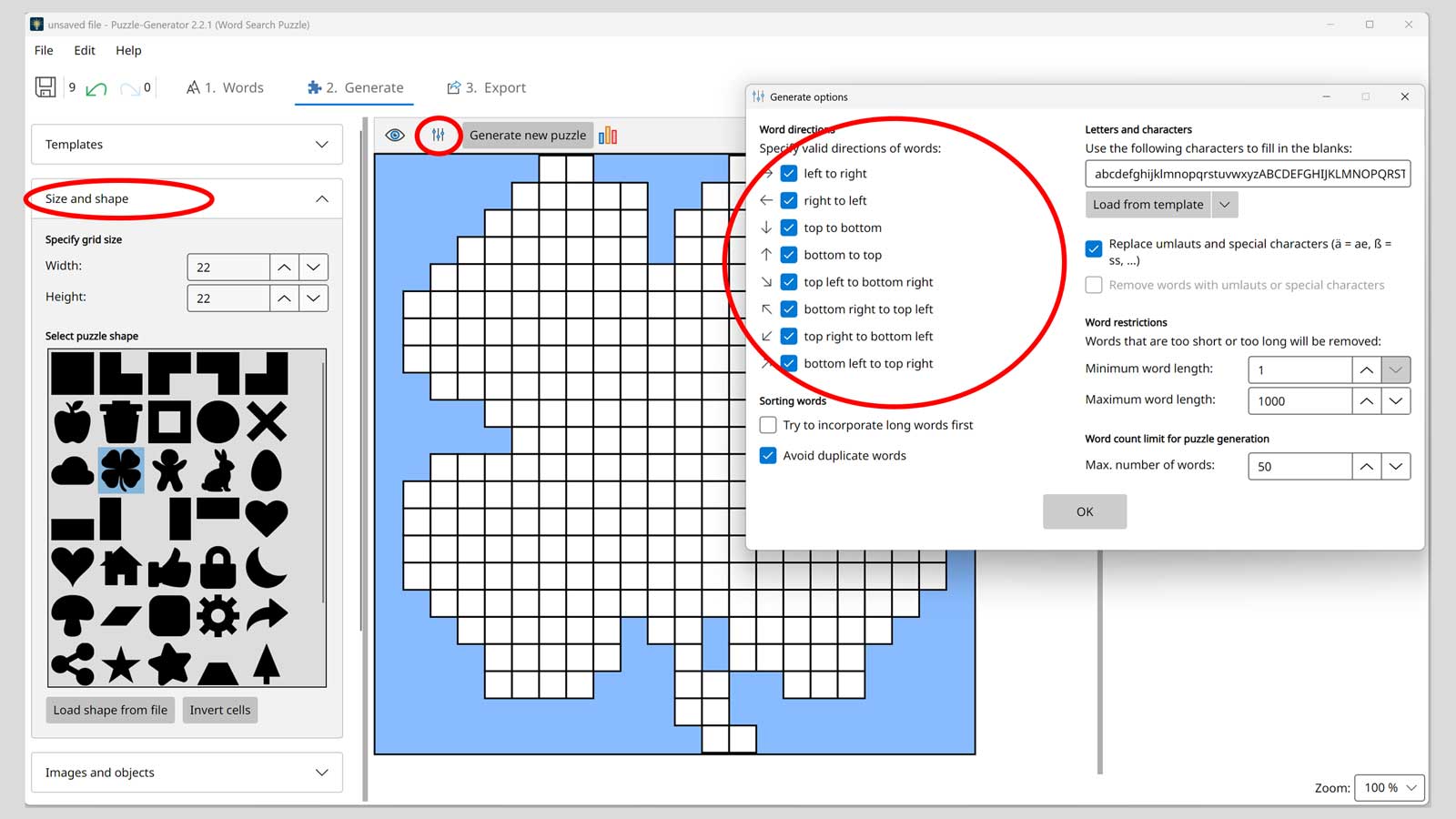
Go to the next section 2. Generate and use the small icon there to access the generation options. Determine in which directions the words may be hidden. Then set the shape and dimensions of the letter grid – for example 16×16 or 20×20 cells.
- Directions: horizontal, vertical, diagonal
- Option: place words backwards as well
- Larger grids allow more words and a higher difficulty level

Insert images and colored cells
Make your word search even more personal by inserting photos or colored cells directly into the grid. Use the Add button in the Images and Objects section.
- Personal photos: Ideal for birthday or wedding puzzles with your own images.
- Colored cells: Use colored cells as design elements or dividers.
- Logos & graphics: Perfect for company events or branded puzzles.
- Images can be freely resized and positioned within the grid.

Generate the puzzle and review the result
Click Generate new puzzle. The preview instantly shows you how the words have been hidden in the letter grid. Next to it you will see statistics with all placed words, the fill rate of the grid and the word positions.
Feel free to generate multiple variations to find the best layout. Words that did not fit into the grid are shown separately – you can adjust the grid size or remove words so that all of them fit.

Customize the design – colors, cells and fonts
Design your word search visually to match your preferences. From a professional look for publishers to a colorful children's puzzle – all elements can be individually customized.
- Customize cell colors, borders and text colors
- Choose fonts and letter sizes
- Background images or gradients (linear/radial)
- Predefined style templates available
- Adjust cell size, spacing and border radius
- Highlight found words with custom highlight colors

Customize background and page elements
Switch to the 3. Export section to define and configure the appearance of your page. Here you decide whether to work with an automatic or manual layout.
- Layout mode: In manual layout you position all elements freely and individually on the page. In automatic layout the content is arranged optimally and automatically.
- Page setup: Set page margins and basic page settings.
- Appearance & layout: Define spacing as well as background color, pattern or a background image.
- Title and description: Add a heading and a short instruction text.
- Hidden words: Display a list of hidden words and customize the font, font size and color to your liking.
Save and load the project
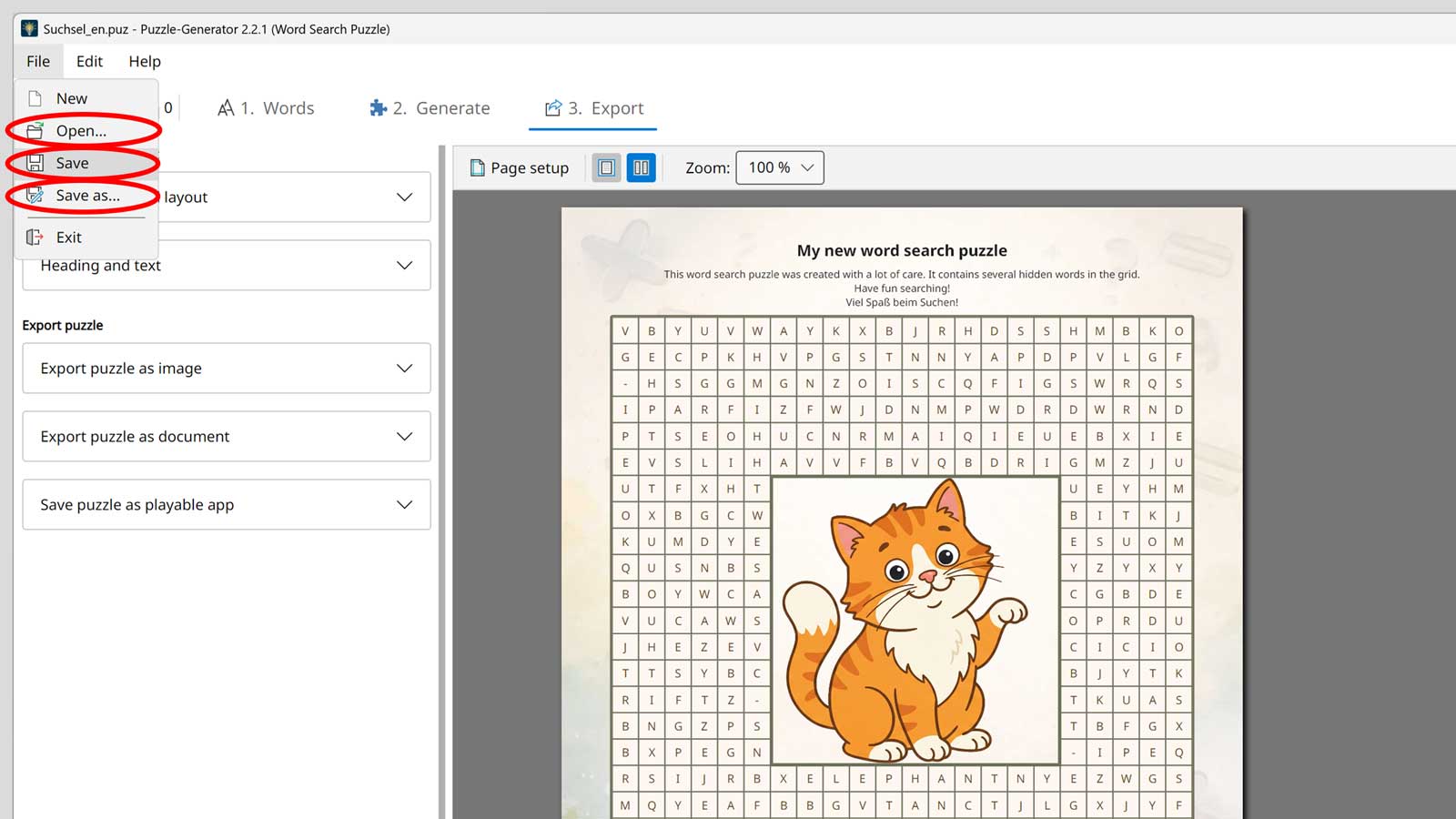
Save your puzzle project so you can continue editing it at any time or reopen it later. This way all settings, layout adjustments and content are fully preserved.
- File → Save: Saves the project as a .puz file for later editing. This file contains all words, layout settings, design options and export configurations.
- File → Open: Opens a previously saved .puz file, so you can continue editing your puzzle exactly where you left off.

Export – PDF, images, Word document
Export your finished word search in the format you need. Puzzle and solution can be exported separately.
- PDF – perfect print quality
- Images (PNG, JPG, WEBP) in custom resolution
- SVG – scalable vector graphics
- DOCX – for editing in Microsoft Word
Tips & Best Practices
Get the most out of your word search puzzle.
Create thematic word lists
Choose words that are thematically related – e.g. all about Summer, Animals or Professions. Coherent word lists make puzzles thematically well-rounded and increase the fun of solving them.
Control the difficulty level
Use the grid size and allowed directions to precisely adjust the difficulty level. For children, smaller grids with only horizontal and vertical words work best; for adults, add diagonal and backwards placed words.
Use puzzle shapes
Use special grid shapes for suitable occasions: a heart for weddings and Valentine's Day, a star for Christmas, a circle for universal themes. The shape makes your puzzle an instant eye-catcher.
Include a solution
Include a hidden solution word or message that is formed from the remaining letters. This gives your puzzle an extra aha moment – perfect for invitations, birthday greetings or teaching materials.
Ideas & Occasions for Word Search Puzzles
Word search puzzles are versatile – here you will find inspiration for your next projects.
School & Education
Ideal for vocabulary training in foreign language classes, for reviewing subject knowledge in various subjects, or as a relaxed warm-up exercise at the start of a lesson. Teachers can create individual puzzles tailored to the current curriculum content.
Children's birthdays & celebrations
Create word search puzzles as a party game or as entertainment for guests. Personalize the puzzle with the birthday child's name, favorite animals or themed party words. With a hidden solution word it becomes an exciting competition.
Companies & team events
Use word search puzzles as an ice-breaker at meetings, as part of onboarding material for new employees, or as an entertaining team-building activity. Hide company values, product names or technical terms in the puzzle.
Magazines & puzzle books
Create professional word search puzzles for print publications, club newsletters or puzzle books. Thanks to PDF and high-resolution image export, you get print-ready results in publishing quality – including a separate solution page.
Ready for your first word search?
Download the Puzzle-Generator and create a personalized word search with your own words in just a few minutes – try it for free.
Download Puzzle-Generator